Kilo Code for iOS and Android Review
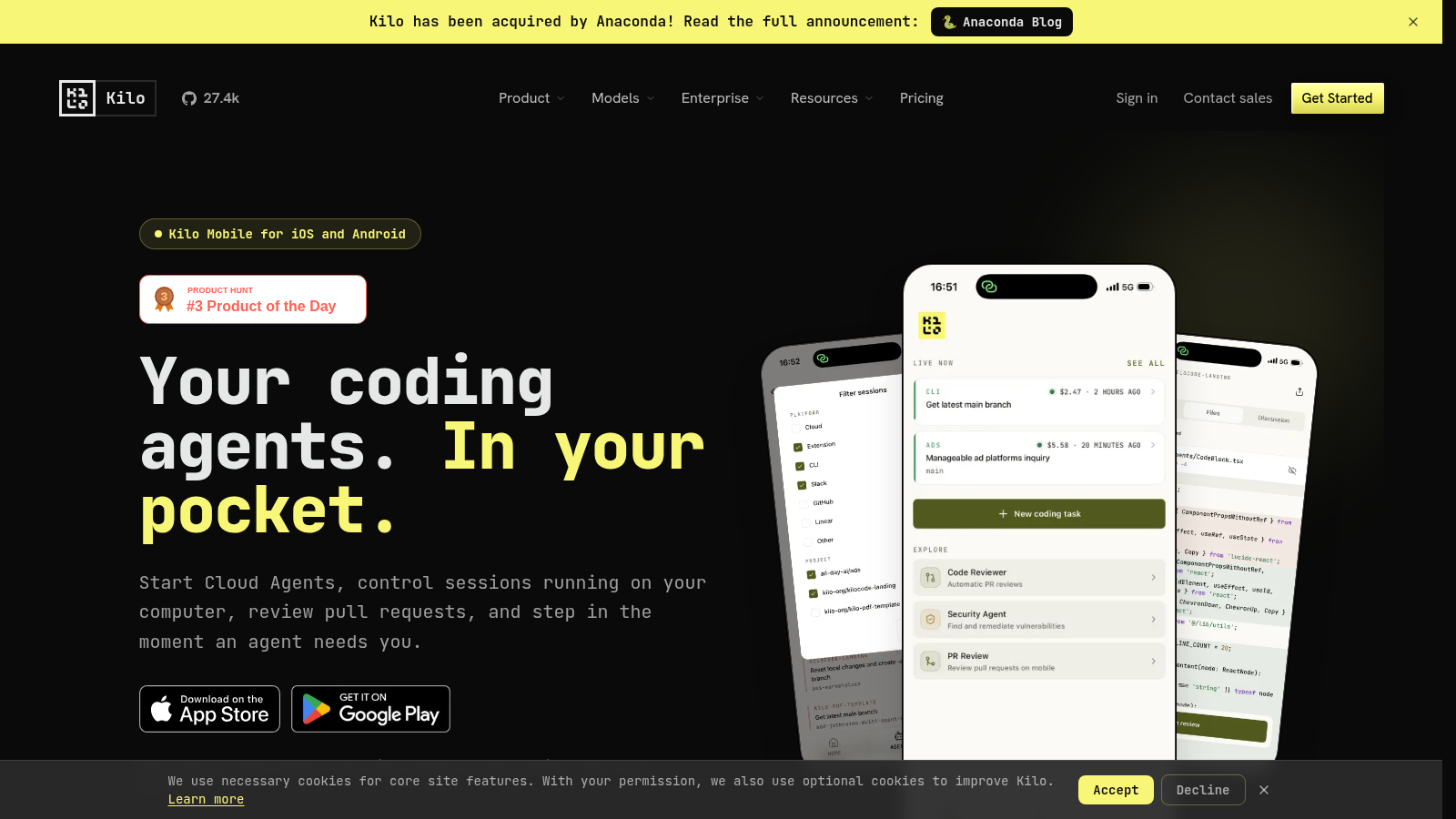
Tired of being tethered to your desk for serious coding? Kilo Code for iOS and Android is here to untether you. This powerful mobile development environment is purpose-built for the modern, agile developer, transforming your smartphone or tablet into a robust command center. It empowers you to tackle critical development tasks, from writing new features to overseeing deployments, all while on the move. Essentially, Kilo Code means your dev environment is always in your pocket, ready when inspiration strikes or an urgent fix is needed.
Main Features
Kilo Code isn’t just a text editor; it’s a comprehensive toolkit designed to boost your productivity anywhere. Its feature set is engineered for efficiency, ensuring you have the tools to manage complex workflows directly from your mobile device.
- Agent Orchestration: Start and manage coding agents, perfect for AI-driven tasks or automated script execution.
- Session Control: Gain full command over remote development sessions, allowing for live debugging and interaction.
- Pull Request Management: Review, comment on, and approve pull requests directly, keeping your team’s CI/CD pipeline flowing.
- Multi-platform Access: Native applications for both iOS and Android ensure a smooth, optimized experience regardless of your device.
| Key Capability | Advantage for Developers |
|---|---|
| On-the-Go Coding | Write and iterate code from any location, without compromise. |
| Remote Resource Management | Control servers, agents, and deployments directly from your device. |
| Collaboration Tools | Engage with team PRs and maintain project momentum, remotely. |
| Full Mobile IDE | Access a complete dev environment, not just a simplified editor. |
Main Target
Kilo Code primarily targets developers and DevOps professionals who value flexibility and continuous productivity. If your workflow demands staying connected to your codebase and infrastructure, even when away from your primary workstation, Kilo Code is for you.
- DevOps Engineers: For managing deployments, monitoring agents, and troubleshooting on the fly.
- Freelance Developers: To maintain productivity and meet deadlines while working remotely or traveling.
- Team Leads: For quick PR reviews and keeping an eye on project health from anywhere.
- Anyone with a “just a moment…” mentality: When you need to push a fix or check a status without firing up your laptop.
Embrace the freedom to code, control, and collaborate from the palm of your hand with Kilo Code.
Top Alternatives to Kilo Code for iOS and Android
Let’s explore and discover the best alternatives and similar tools to Kilo Code for iOS and Android, carefully selected and ranked based on functionality, reliability, and user experience.