DocsAlot CLI Review
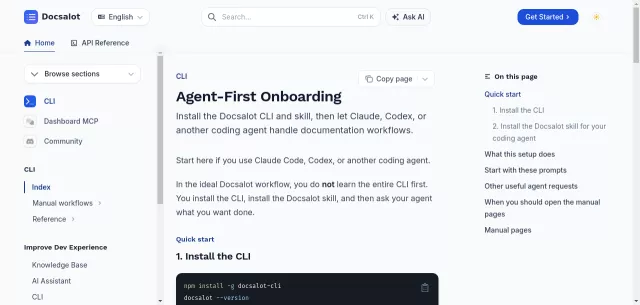
Tired of wrestling with documentation workflows? DocsAlot CLI emerges as a game-changer, an AI-powered command-line interface designed to let your coding agents like Claude or Codex effortlessly create and maintain good-looking documentation. It’s built on an “Agent-First Onboarding” principle, flipping the traditional learning curve on its head. Instead of you mastering every command, you empower your AI to drive the entire documentation process, from initial setup to continuous updates.
Unleashing AI for Documentation
The core philosophy behind DocsAlot CLI is remarkably simple and efficient. Your onboarding journey is streamlined:
- You install the CLI globally.
- You install the DocsAlot skill for your preferred coding agent.
And that’s it! From there, your agent handles the heavy lifting. It intelligently chooses the correct DocsAlot commands for creating, pulling, previewing, pushing, publishing, and even migrating your documentation. This setup ensures that mastering manual CLI commands becomes entirely optional, freeing developers to focus on code while their AI ensures documentation remains impeccable.
Here are some of the powerful capabilities your AI agent can manage:
| Key Capability | Example Agent Prompt |
|---|---|
| New Documentation Creation | use docsalot cli to create a new set of documentation and run a preview |
| Content Migration | use docsalot cli to migrate my existing documentation located at path-to-docs, to docsalot framework |
| Source Code to Docs | use docsalot cli to look at my source code changes and create docs for me |
| Custom Domain Setup | use docsalot cli to point this documentation to docs.yourdomain.com |
Who is DocsAlot CLI For?
DocsAlot CLI is tailor-made for developers and teams whose workflow already integrates advanced coding agents like Claude Code or Codex. If you’re leveraging AI for code generation and maintenance, extending that intelligence to your documentation makes perfect sense. It’s for anyone looking to automate the often-tedious task of keeping docs updated and aligned with code changes, ensuring your project always has polished, current, and accessible documentation.
While the AI drives most interactions, manual pages are available for advanced scenarios like scripting CI/CD pipelines, troubleshooting specific issues, or when your agent specifically requests a manual command.
Top Alternatives to DocsAlot CLI
Let’s explore and discover the best alternatives and similar tools to DocsAlot CLI, carefully selected and ranked based on functionality, reliability, and user experience.