TerminalWidget Review
Ever wished your desktop widgets could tell you more than just the weather or your calendar? Enter TerminalWidget, the ultimate utility for Mac, iPhone, and iPad that transforms raw script output into actionable, glanceable information right on your Desktop or Home screen. Forget constantly opening your terminal; TerminalWidget bridges the gap, allowing you to pipe command output, API responses, and Shortcut results directly to fully customizable widgets across macOS, iOS, and iPadOS.
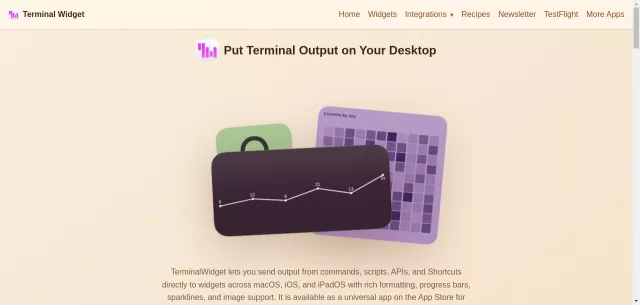
This universal app, available on the App Store for $19.99, empowers developers, system administrators, and automation enthusiasts to create dynamic dashboards. With support for rich formatting, progress bars, intricate sparklines, and even image rendering, your data has never looked this good, nor been this accessible.
Main Features
- Versatile Output: Display plain text from terminal commands, generate a wide array of charts (radial, matrix, sparklines), tables, or render local and remote images, including those generated by APIs, with edge-to-edge support.
- Deep Customization: Take full control over the visual presentation with granular options for colors, fonts, and icons.
- Cross-Device Sync: Widgets and their configurations effortlessly sync across your entire Apple ecosystem (Mac, iPhone, iPad) via iCloud, ensuring consistency.
- Rapid Updates: Experience instant updates on macOS and rapid refresh rates on iOS, keeping your critical data current.
- Comprehensive Automation: A full Command Line Interface (CLI) for scripting, dedicated Shortcuts actions, AppleScript support, and a URL scheme ensure seamless integration into any existing workflow.
- Dynamic Visualizations: Easily display progress bars (0-100), or generate sophisticated charts and graphs by simply passing serial integer data.
Main Target
TerminalWidget is meticulously engineered for anyone who lives and breathes the command line, strives for efficiency, and demands critical data at their fingertips without interruption. It’s an indispensable tool for:
| Developers & Engineers | Monitor build statuses, API endpoint health, server logs, or package update notifications. |
| System Administrators | Keep a constant eye on resource usage, network statistics, critical log events, or service statuses. |
| Power Users & Automators | Craft personalized dashboards for smart home data, stock prices, crypto trends, or any custom script output imaginable. |
Whether you’re tracking your CI/CD pipeline, monitoring sensor data, or just want a custom “Hello World” that updates every second, TerminalWidget provides the flexible framework to seamlessly bring your terminal directly to your desktop.
Top Alternatives to TerminalWidget
Let’s explore and discover the best alternatives and similar tools to TerminalWidget, carefully selected and ranked based on functionality, reliability, and user experience.