Reframe Review
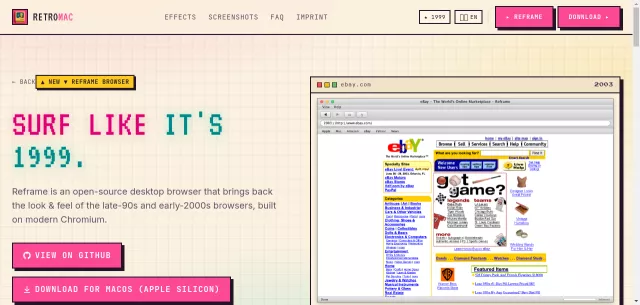
Ever wish you could dial back the clock and surf the web like it was 1999? Enter Reframe, the open-source Electron browser for macOS that makes that digital dream a reality. This isn’t just a skin; Reframe meticulously recreates the iconic look and feel of legendary browsers like Safari 1.0, Netscape 4.8, Firefox 1.0, and Internet Explorer 5.0. Yet, beneath its pixel-perfect retro facade, a powerful, modern Chromium engine purrs, ensuring full compatibility with today’s complex web. It’s the ultimate blend of nostalgic aesthetics and contemporary functionality, inviting you to rediscover the internet through the eyes of yesteryear.
The Browser Time Machine: Main Features
Reframe is more than just a visual throwback; it’s a fully functional browser engineered for an authentic retro experience:
- Pixel-Perfect UI: Dive into meticulously reproduced user interfaces, complete with classic toolbars, status bars, and the spinning “throbber” that once captivated us.
- Modern Web Engine: Powered by Chromium, Reframe handles JavaScript, video, and the most demanding web apps with ease, ensuring you can truly browse the modern internet.
- Built-in Wayback Mode: Experience websites as they once were, thanks to an integrated Wayback Mode that lets you revisit the past directly from your browser.
- Four Classic Themes: Seamlessly switch between the brushed metal of Safari 1.0, the famous N logo of Netscape 4.8, the revolutionary interface of Firefox 1.0, or the familiar grey chrome of Internet Explorer 5.0.
- Open Source & macOS Exclusive: Built with Electron, Reframe is an open-source project specifically crafted for macOS, welcoming contributions from the community.
Who Needs to Reframe Their Browsing?
While Reframe isn’t designed to be your everyday browser, it perfectly fills a niche for a specific kind of user. This desktop companion is a must-have for:
| User Profile | Why Reframe? |
|---|---|
| Retro Computing Enthusiasts | The ultimate tool for a genuine late-90s/early-2000s desktop experience, especially when paired with vintage OS emulators. |
| Nostalgia Seekers | Relive those formative internet moments and rediscover the web through the charming interfaces of yesteryear. |
| Digital Historians | Explore the evolution of web design and user interfaces with pixel-accurate recreations and integrated Wayback functionality. |
| Open-Source Advocates | Explore a beautifully crafted Electron application, contribute to its development, or simply appreciate the artistry of its creation. |
Reframe is for those moments when you want to bring the good old days back to your desktop, making it the ideal complement to your digital toolkit.
Top Alternatives to Reframe
Let’s explore and discover the best alternatives and similar tools to Reframe, carefully selected and ranked based on functionality, reliability, and user experience.