Inbox Zero Review
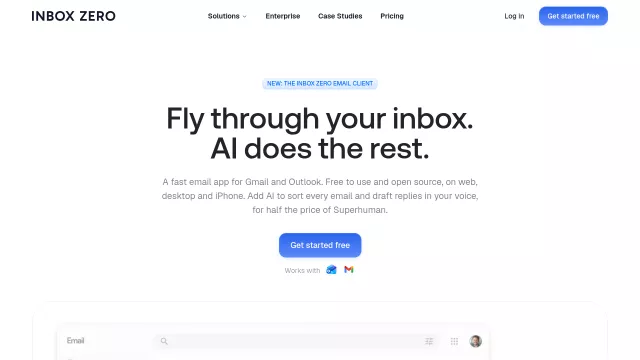
Inbox Zero isn’t just another email client; it’s a productivity powerhouse crafted for the discerning digital native. This open-source AI email client for Gmail and Outlook aims to liberate you from inbox clutter, transforming email management into a swift, keyboard-driven experience. Think Superhuman, but with the transparency and community spirit only open source can provide, plus powerful AI at your fingertips, all designed to get you back an hour a day.
Main Features
Diving into the core functionalities, Inbox Zero boasts a suite of features designed to supercharge your email workflow:
- Keyboard-First Navigation: Master your inbox with lightning-fast shortcuts (J, K, E, H, R, Z, ⌘K) – no mouse required.
- AI-Powered Inbox Sorting: Intelligent AI automatically labels incoming emails into custom splits like “To Reply,” “Newsletter,” and “Calendar,” ensuring you focus on what truly matters.
- Voice-Cloned AI Drafts: Say goodbye to writer’s block. AI drafts replies in your unique style, pre-populated with context from past conversations and your calendar, ready for a quick edit and send.
- Unified Account Management: Consolidate all your Gmail and Outlook accounts into a single, cohesive inbox, simplifying cross-account management.
- Team Collaboration: Streamline team communication with integrated comments directly within email threads, @mentioning colleagues without clogging up their inboxes.
- Open Source & Privacy-Centric: With its AGPL license, you can inspect the code. Plus, your data stays private with no AI training, SOC 2 Type 2 certification, and even self-hosting options.
| Key Differentiator | Inbox Zero’s Approach |
| Core Philosophy | Open-source, privacy-first, community-driven |
| AI Integration | Contextual AI for sorting and drafting replies in your voice |
| Cost Efficiency | Free email client, AI features for half the price of alternatives |
| User Control | Self-host option, SOC 2 Type 2 compliant, no AI training on your data |
Main Target
Who stands to benefit most from wielding the power of Inbox Zero? This tool is engineered for individuals and teams who:
- Demand Efficiency: Professionals, entrepreneurs, and executives eager to reclaim hours lost to tedious email management.
- Embrace the Keyboard: Users who prefer keyboard shortcuts and swift navigation over mouse-driven interfaces.
- Value Transparency & Privacy: Tech-savvy individuals and organizations prioritizing open-source solutions and robust data privacy.
- Seek Superhuman Alternatives: Anyone looking for a powerful, AI-accelerated email experience similar to Superhuman but with more control and a more accessible price point.
- Manage Multiple Accounts: Users juggling work and personal Gmail/Outlook accounts who need a unified, intelligent inbox.
Top Alternatives to Inbox Zero
Let’s explore and discover the best alternatives and similar tools to Inbox Zero, carefully selected and ranked based on functionality, reliability, and user experience.