Annotate Review
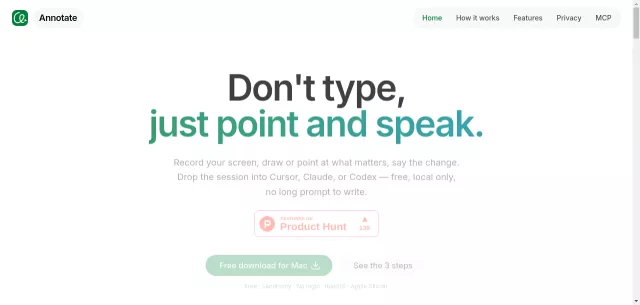
Tired of wrestling with lengthy text prompts to articulate your development needs to AI agents? Enter Annotate, the revolutionary macOS tool that transforms screen recordings into powerful, context-rich prompts. Forget typing; with Annotate, you simply record your screen, point at elements, speak your desired changes, and seamlessly hand it off to your preferred AI — be it Cursor, Claude, or Codex. It’s local-only, free, and built for Apple Silicon, keeping your data secure on your machine.
Main Features: Unleash Your AI’s Potential
- Record Your Screen: Capture single windows or entire multi-monitor setups in one unified session, giving your agent the full picture.
- Point and Speak: Draw precise shapes (pens, rectangles) directly on the UI and voice your changes aloud. This eliminates ambiguity, telling the AI exactly which button or element you mean.
- Agent Handoff: Seamlessly integrate. Your recorded session drops directly into Cursor, Claude, or Codex, allowing these agents to take immediate action based on visual and auditory cues.
- Token Efficiency & Clear Intent: Instead of heavy video files, Annotate leverages MCP to feed frames and speech, ensuring your agent understands intent with fewer tokens.
- Local-First Security: Designed with privacy in mind. All recordings and transcripts stay on your Mac, ensuring nothing ever leaves your device.
- Beyond Screenshots: Static images are history. Annotate captures motion, clicks, timing, and your voice, providing a dynamic narrative far superior to a frozen frame.
Who Needs Annotate? Target Acquired!
Annotate is engineered for efficiency and precision, making it an indispensable tool for a specific cohort of tech-savvy users:
- Developers & Programmers: Especially those leveraging AI coding assistants like Cursor, Claude, or Codex for iterative development and code generation.
- AI Agent Users: Anyone who regularly interfaces with advanced AI models for tasks requiring visual context and specific UI manipulation.
- Efficiency Enthusiasts: Individuals who abhor redundant typing and seek streamlined workflows to accelerate their project delivery.
- Privacy-Conscious Mac Users: With its local-only operation and Apple Silicon optimization, it’s perfect for those prioritizing data security and native performance.
| Aspect | Annotate’s Superiority |
|---|---|
| Prompt Creation | Show, Don’t Tell – Visual & Voice |
| AI Context | Dynamic, Synced Frames & Speech |
| Data Privacy | 100% Local – On Your Mac Only |
Top Alternatives to Annotate
Let’s explore and discover the best alternatives and similar tools to Annotate, carefully selected and ranked based on functionality, reliability, and user experience.